THE BETA IS ABOUT TO OPEN · FREE FOR MAC

One assistant for all your AI agents.

Ask for what you need in one sentence, typed or spoken. Velion opens an agent session in each project, tells you when they finish and gathers what is waiting for your answer.

No card needed. You will get an email to confirm and download the guide "Your first job with an AI agent".

Beta v0.1 design: the Velion window on the Mac with several agent sessions, and the iPhone with a voice request.
This is Beta v0.1
Works with
  • Claude Code
  • Codex
  • OpenCode
  • Gentle-Shell
with your own subscriptions

THE PROBLEM

Today each of your agents lives in its own terminal.

  • 01

    Several terminals open

    One per project, each with its own session. You lose track of which one does what.

  • 02

    Permissions you miss

    An agent stops to ask your permission and nobody sees it until much later.

  • 03

    No place to see what is running

    There is no single panel: to know how everything is going, you open window after window.

Velion solves it.

One assistant that opens the sessions, watches them and tells you when your answer is needed.

WHAT THE BETA WILL DO

Everything your agents do, in one place.

01

Each agent in its project, in view.

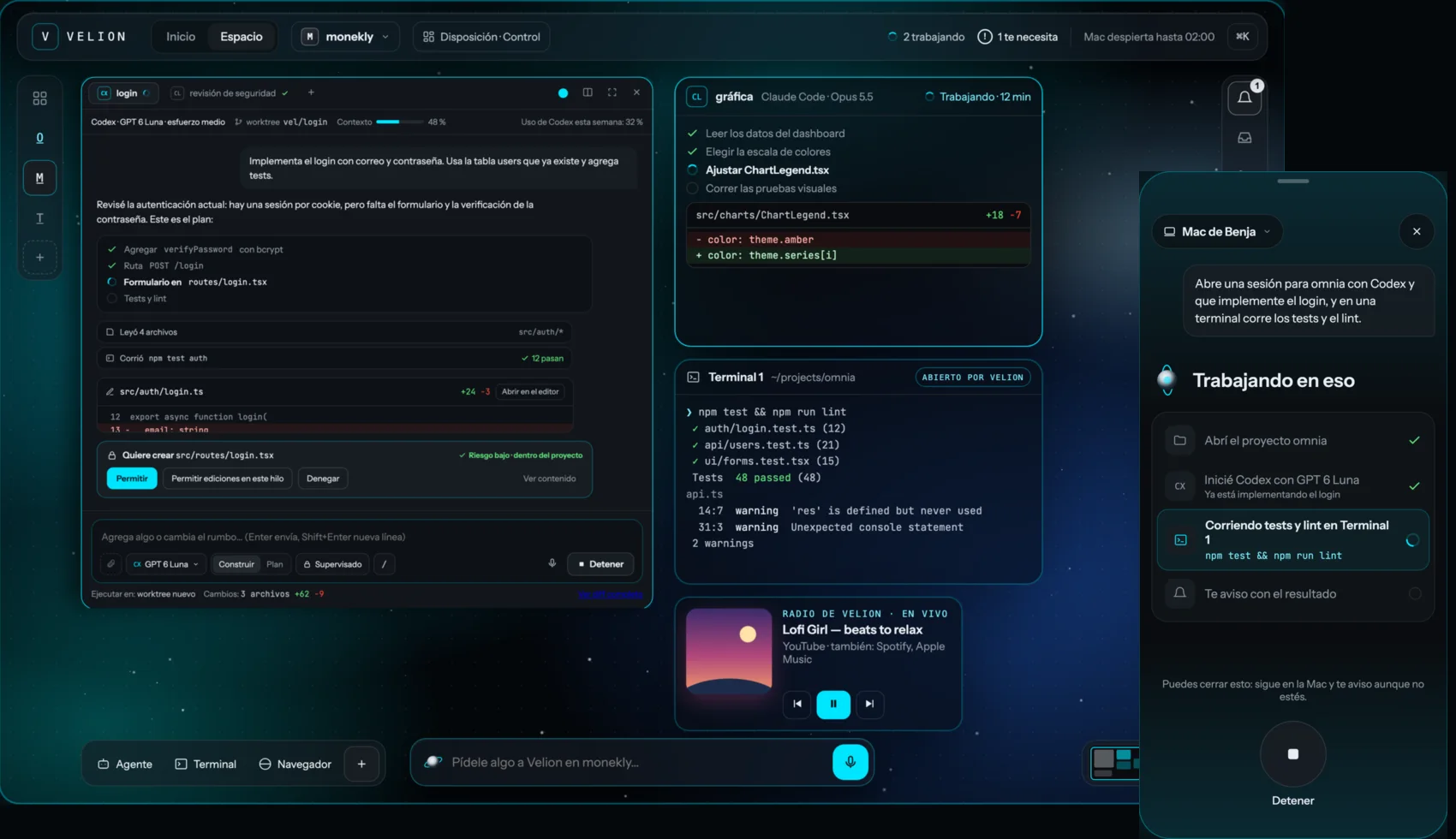
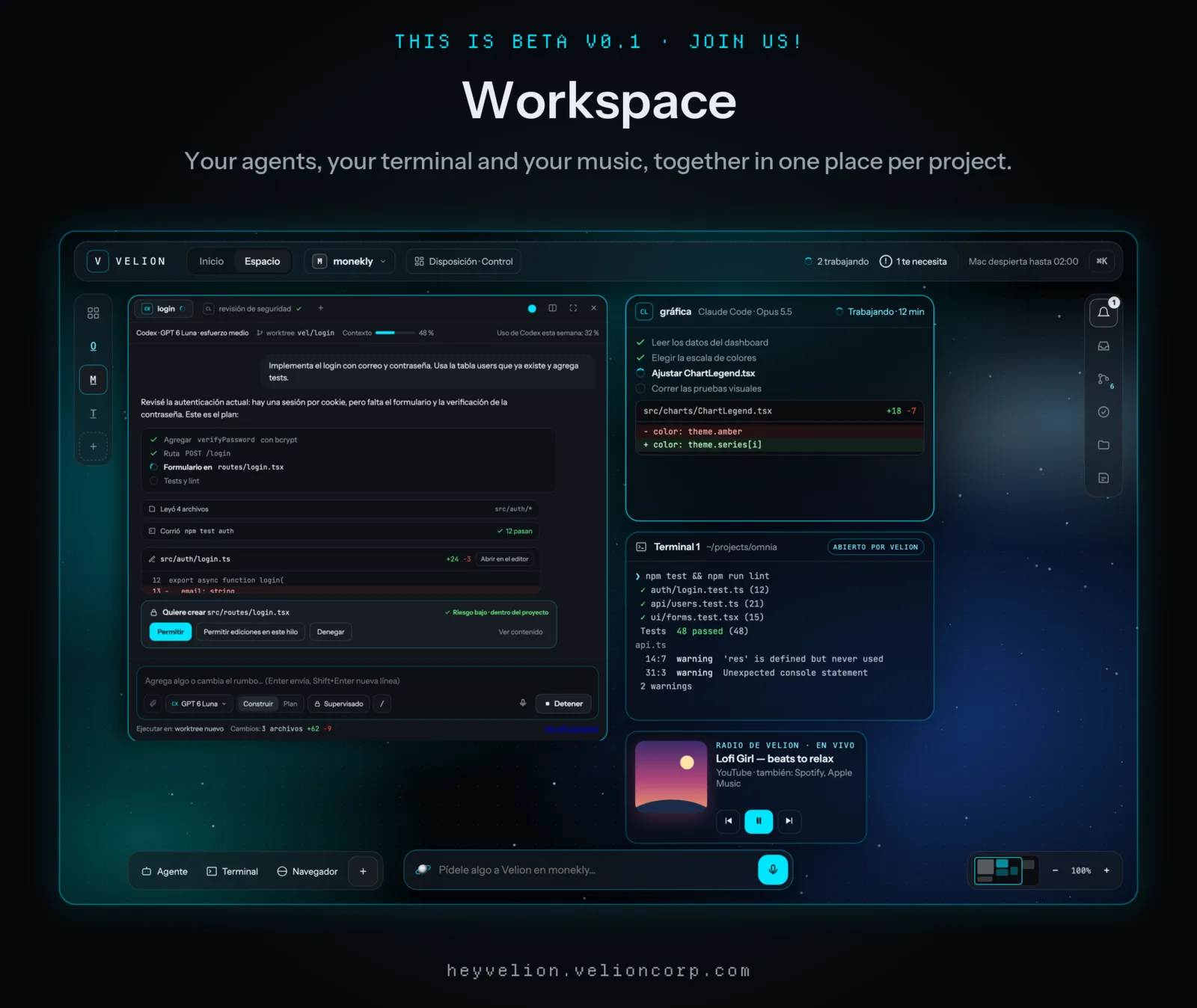
Each agent works in its own project and you see it here: the conversation, the changes, the terminal and the browser, together and in view.

  • Claude Code, Codex, OpenCode and Gentle-Shell in the same space
  • Terminal and browser opened by Velion
  • Ask Velion for something in the project you are looking at
Design of the Velion workspace: a Codex session asking for permission, a Claude Code session working, a terminal and the Pending panel.

02

What is waiting for your answer, together.

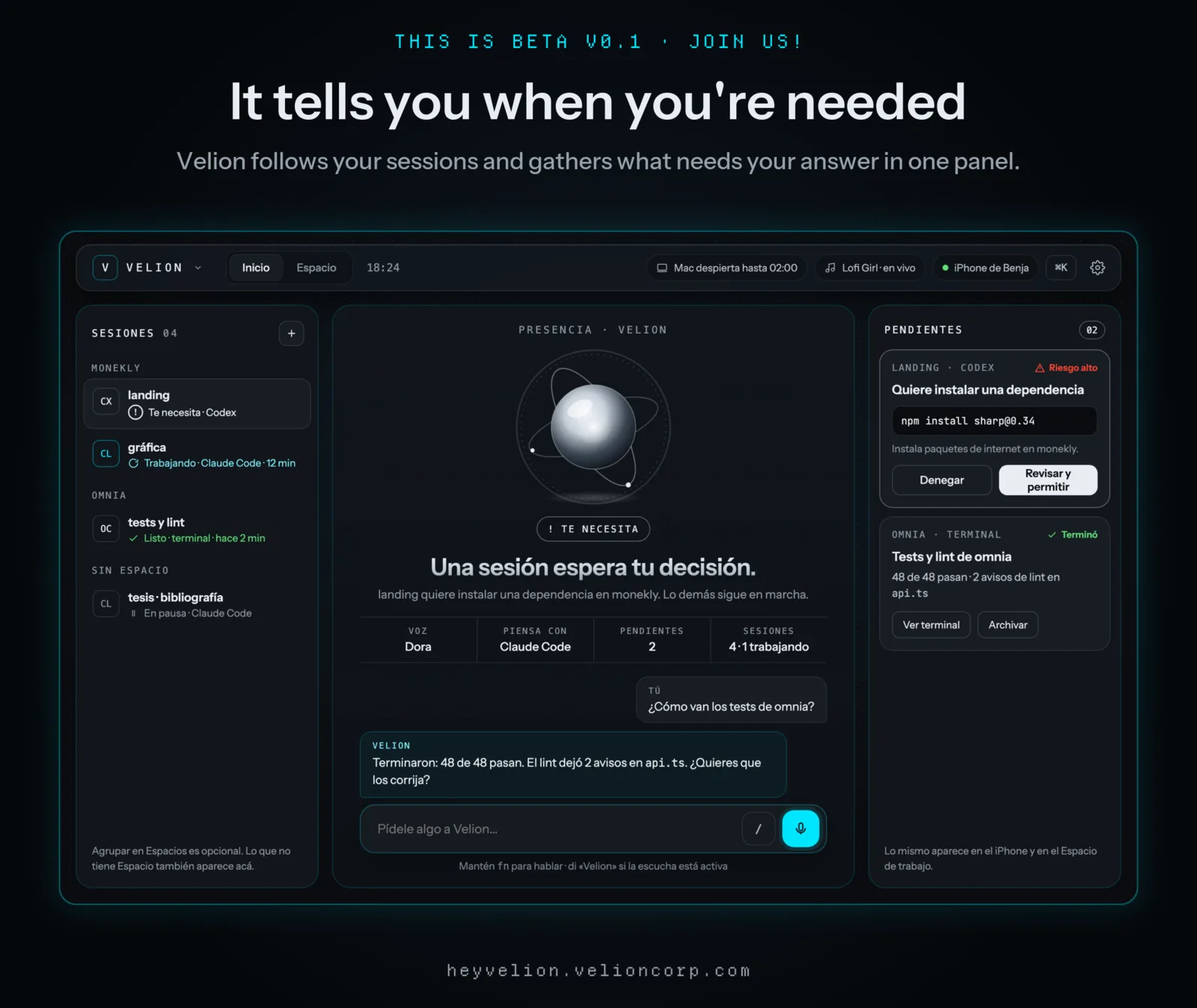
A permission, a question, a failure. Velion gathers them in one panel so you answer and the agent carries on, without going terminal by terminal.

  • Which sessions are working and which need you
  • Notices when a job finishes, with its summary
  • Permissions with their risk level in view
Design of the Velion home: sessions by project and the Pending panel with what needs your answer.

03

One sentence, several agents.

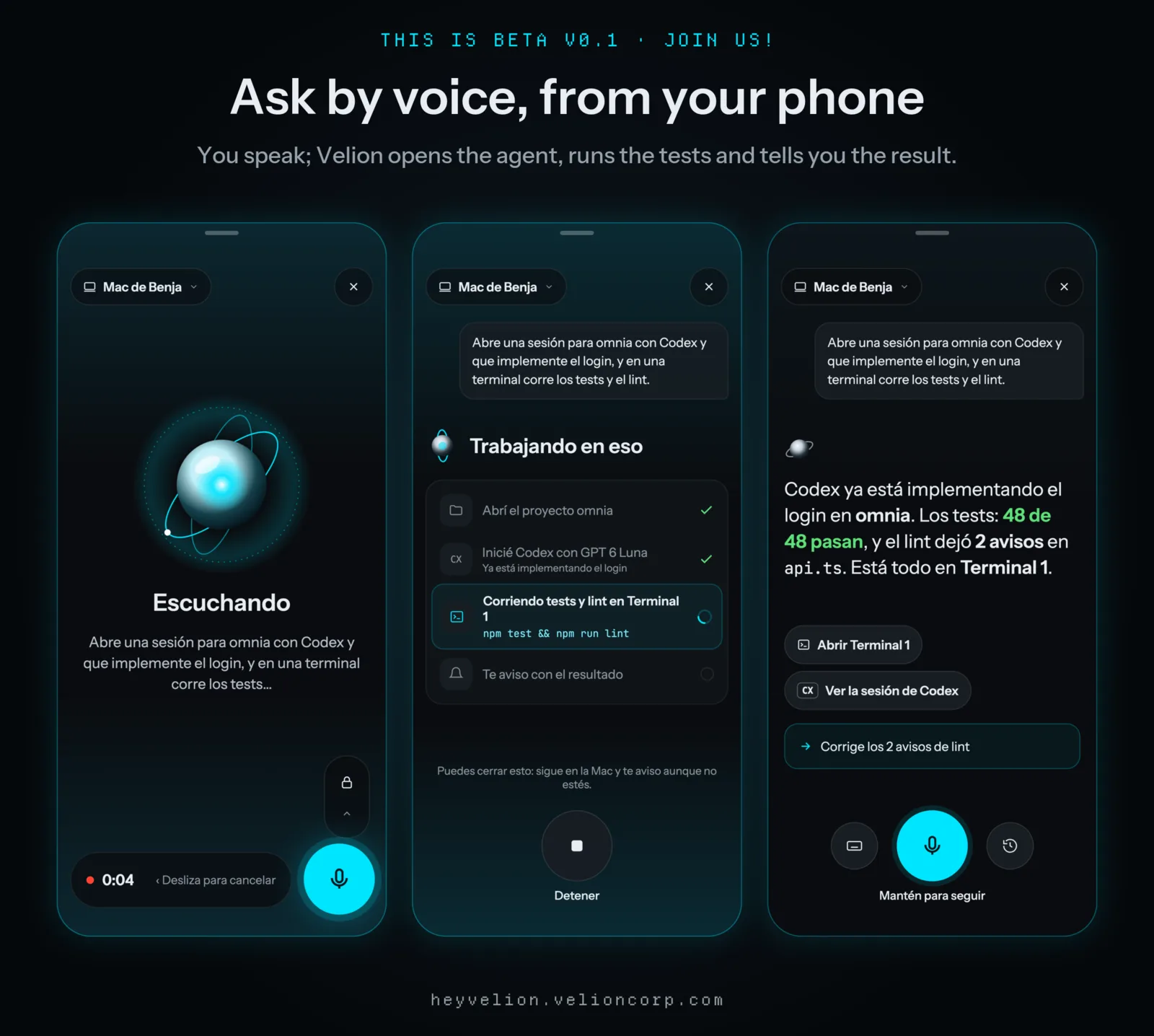
Hold the button on the iPhone and say what you need. Velion understands, opens the sessions on your Mac and tells you how it is going.

  • One sentence can open several agents, one per project
  • You can close the app: the work keeps running on your Mac
  • It answers with a summary and shortcuts to each session
Design of the iPhone app: listening to a voice request, working on it, and the summary with shortcuts.
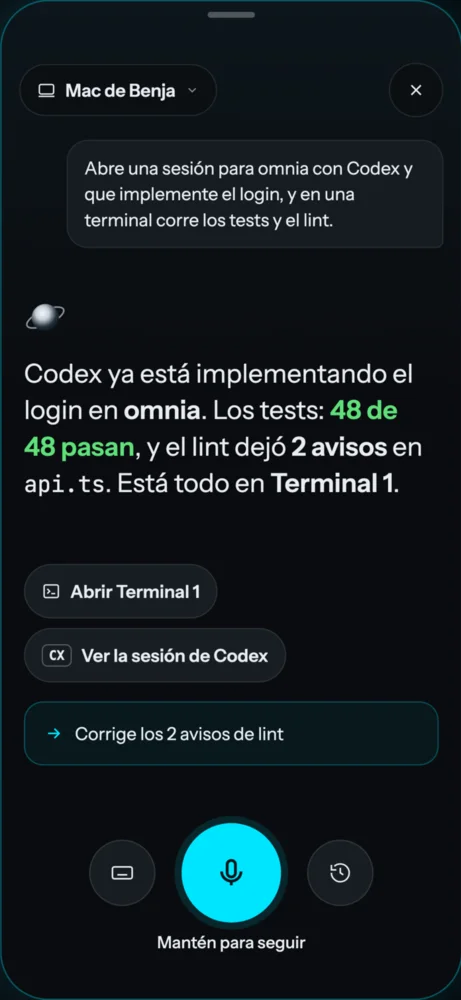
Design of the iPhone app: Velion summarizes that Codex is implementing the login, with shortcuts to open the terminal and the session.
This is Beta v0.1

ON YOUR PHONE

Your Mac keeps working. You, wherever you are.

From your phone you see and manage all your sessions: open one, write to it, start a new one and get the notice when it finishes.

  • See everythingThe list of sessions with the status of each.
  • AnswerReply to a permission or a question without going back to your desk.
  • SpeakAsk Velion for what you need with your voice.

Android comes later: it will be your phone's system, operated by voice.

GET STARTED

Three steps.

  1. 01

    Join the beta

    Leave your email and confirm it. You get the guide "Your first job with an AI agent" and a notice when it opens.

  2. 02

    Connect your agents

    Install Velion on your Mac and use your own Claude Code, Codex, OpenCode or Gentle-Shell accounts.

  3. 03

    Ask for what you need

    In one sentence, typed or spoken. Velion opens the sessions and tells you when they finish.

WHAT IS COMING

Velion as the place where everything connects.

Beta v0.1 is the first step. This is the direction:

  • Manage your phone or your laptop from Velion.
  • Send messages without leaving Velion.
  • Share a project's context with a teammate, using your agent's memory.
  • With one gesture, send a video from your phone to the TV, if the other side accepts.

Not in beta v0.1 yet.

Built so you can trust it.

  • Runs on your Mac

    The agents work on your computer, in your projects.

  • Your credentials stay on your Mac

    Velion uses your own subscriptions; it does not ask you to hand over your accounts.

  • Free beta

    Joining costs nothing and asks for no card.

Frequently asked questions

How much does it cost?

The beta is free. If you take part, you get 15 days at no cost when the first version ships. We are not publishing prices yet.

Which agents does it work with?

Claude Code, Codex, OpenCode and Gentle-Shell, using your own subscriptions. You do not need to give Velion your accounts.

Which devices does it run on?

Mac first, plus an iPhone if you want to manage it from your phone. Android comes later: it will be your phone's system, operated by voice.

Do I need to code or already use agents?

No. The beta is for people who already use AI agents and for people who want to start. If you are just starting, joining gets you the free guide "Your first job with an AI agent".

What do you do with my data?

We use your email to confirm your sign-up, tell you when the beta opens and send you news. It is stored on Velion SpA's own infrastructure, in Chile, we do not sell your data and you can unsubscribe with a link in every email.

What do I get when I sign up?

An email to confirm your sign-up. Once confirmed: the guide "Your first job with an AI agent", a notice when the beta opens and an invitation to the beta community on Discord.

Is Velion an AI model?

No. The models are the ones that think; Velion is the one that uses them: it starts your agents, spreads the work across your projects and tells you.
Be among the first to use Velion.

The Mac beta is free and about to open. Leave your email and we will let you know.

Claude Code · Codex · OpenCode · Gentle-Shell